Saturday, July 30, 2016

Maya 2017 (finally)

Maya 2017 here (I borrowed this picture from Autodesk).


As I'm looking at the new features since the Extension 2 (I wrote about it here) it seems the big hit is that Autodesk switched to Arnold as a main production renderer inside Maya. It is really BIG like this: BIG.


Other feature is the Time Editor which has no feature video yet. We can find out what is it in the maya 2017 docs.

Tuesday, July 26, 2016

Technical Papers 1. (Try to avoid overdose of information) - Sketch Animation Poses

Recently I've checked a lot of technical papers (in connection with CGI of course). We can simply overdose ourself with information via surfing on the net. So I try to avoid that and just feature technical papers and videos one by one what I liked most.


In connection with that I found an interesting development project using Blender:


Wednesday, June 8, 2016

Pixar's Universal Scene Description (USD) - Generalization of Pipelines

It is time to write about it because it seems we can have it soon. Pixar Animation Studio announced its intent to release its Universal Scene Description software (USD) as an open-source project by summer 2016.


So what is USD and what we can except if it will be used by VFX/CG studios all over the world. My opinion is that there is shift in the industry which leads to the generalization of pipelines and open-source technologies have key role in it.

Commonplace is that: every pipeline is different. It might be true but the end of the day studios, managers, supervisors, artists are facing the same or very similar issues day by day. There is the need to be more efficient and the CG/VFX pipeline is more and more in focus. But there are no off-the-shelf products so every studio has to develop in-house technologies and tools to manage their work. Usually the main driving forces of the development are the projects which are generates a lot of practices (how to name things for eg.). Ideally these practises are evaluated after and before the projects and could be implemented into the pipeline. So the pipeline evolves but this evolutions is rather some thing like agile software development which is works fine for a short term. In long term the pipeline development is based on the legacy of previous works and that is why every pipeline can be different.

But we can get to the point where the pipeline won't let us to be more efficient because of the legacy. For example it won't let us (or it would be too expensive) to implement new technologies, solve bottlenecks. And that is the time when the pipeline should be re-evaluated as a whole. The process is the generalization of the problems we face day by day. On a long term (might be decades) it has to result that studio pipelines are getting more and more similar. Of course there are new technologies, hardwares and the softwares which can distract the generalization process. That is why I think open-source technologies have key role in that, because the CG/VFX community can work together on the so called "best practise".

Universal Scene Description is a promise to generalize the way we build up 3D scenes and share between different (most likely 3D) softwares like Maya, Houdini, Katana, etc. They are on their way: as the FAQ says linux version can be downloaded and windows implementation is coming soon. Extended documentation and tutorials are also there.

Friday, May 27, 2016

Nuke - Print out AppendClip Inputs

AppendClip node is useful for anything like viewing a bunch of shots after each other. I used it to check out different versions of FumeFX simulations. Only one thing I had to find out: how to print the current version (version of the file sequence) of the effect out to the screen. Using a Text node we could utilize python commands within the message field. So the node graph is something like this:


And the python command (it called from TCL):


[python {nuke.thisNode().metadata()['input/filename'].split('/')[-1]}]

I don't know much about TCL but I could figure it out how it would look like in TCL syntax:

[lindex [split [metadata input/filename] {/}] end] 


It reads the node's metadata which is passed through by the current read node. The metadata holds the input/filename key and that is what we are looking for. nuke.thisNode is the node where the comman is called (the Text node in this case). Further information is here. In TCL it seems there is a basic metadata command.

Thursday, April 21, 2016

Waiting for Maya 2017 - Maya 2016 Extension 2

It seems Autodesk is late to announcing the annual version of Maya. I have the idea what kind of improvements will be in the new release. They have already featured as Maya Extension 2 (Extension 1 was published around the last summer). Or it means there won't be Maya 2017? Or they are just waiting to 2017 to announce Maya 2017?


Motion Graphics Toolset


Deep Adaptive Fluid Simulation


Enhanced Animation Performance

Shape Authoring Workflow and Character Rigging


Enhanced Symmetry Modelling

Render Setup


Monday, April 4, 2016

Maya Bug - Viewport 2.0 - Gimbal Axis

Another viewport 2.0 bug. If we rotating an item in hierarchy, a joint for example, we will see that the axes are rotating in a strange way. Since we rotated in one direction we can't rotate by grabbing the manipulator's circles (representing the x, y, z axes) any more because they actually have a different orientation. If we switch back to legacy viewport we will see the correct orientations.

In viewport 2.0 looks like this:


And the correct legacy viewport shows this:


 I tend to call legacy viewport as legal viewport recently because it seems viewport 2.0 is corrupted (sometimes).


Thursday, March 3, 2016

Nuke - Reformat to Bounding Box Size

Sometimes we have weird formats to work with in Nuke like this:

Occasionally we want to reformat an image to the size of another image. In that situation we have to choose the format from the format list (output format).


There are a lot of formats shipped with Nuke and we can also add custom formats via python or do it manually. We can add these customizations to the menu.py to use as a default startup. When we read an image sequence which has a format which is not included in the predefined format list we will find that on the bottom of the list as an unnamed item with it's size (for eg. 5184x3456 as we can see):


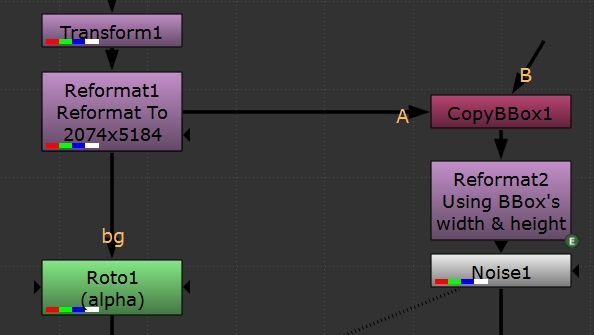
 But using Refomat or Crop node can produce even more specific formats like the first image (2074x5184). There are couple of ways to use that format in the graph. I found that the easiest way is the following:

Using a CopyBBox node can copy the bounding box infromation to another branch of the graph. The Reformat node can use that info just have to use a simple expression. So the reformat type is "to box" and the width/height are the following expressions:
box_width = bbox.w
box_height = bbox.h


So the Noise node after that Reformat will have the same size: