On a sunny morning at the beginning of March I found that if I hit OpenGL render active viewport in the Video Sequence Editor Blender crashed. I tried it different ways and I realized that the reason is the scene had Grace Pencil drawing. It was a bug. I was kind of newbe using Blender but I had internet so I search for bug reporting. I found that article in Blender Nation:
Reporting Bugs in Blender
I just followed the instruction. I had to register on developer.blender.org forum. So I report the bug on 1st of March (2017) and within a day I got the confirmation and on the same day there was a new daily release which did not produce the crash. Pretty amazing, isn't it! Which commercial software company can compete with this?
Btw the (latest) daily build which can be found here: https://builder.blender.org/download
Showing posts with label bug. Show all posts
Showing posts with label bug. Show all posts
Thursday, March 16, 2017

Monday, April 4, 2016
Maya Bug - Viewport 2.0 - Gimbal Axis
Another viewport 2.0 bug. If we rotating an item in hierarchy, a joint for example, we will see that the axes are rotating in a strange way. Since we rotated in one direction we can't rotate by grabbing the manipulator's circles (representing the x, y, z axes) any more because they actually have a different orientation. If we switch back to legacy viewport we will see the correct orientations.
In viewport 2.0 looks like this:
 And the correct legacy viewport shows this:
 I tend to call legacy viewport as legal viewport recently because it seems viewport 2.0 is corrupted (sometimes).
In viewport 2.0 looks like this:


Monday, February 1, 2016
Maya Bug - Viewport 2.0 Refresh
I tested on Maya 2015 and 2016. For example if we create a multilevel instanced hierarchy:

and remove one object at the second level:
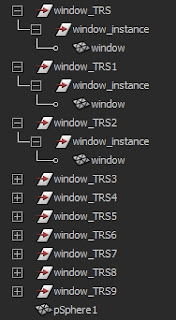
the object looks still instanced in the viewport:

If we change to Legacy Default Viewport it looks correct. To refresh Viewport 2.0 I had to reload the maya scene.

and remove one object at the second level:

the object looks still instanced in the viewport:

If we change to Legacy Default Viewport it looks correct. To refresh Viewport 2.0 I had to reload the maya scene.
Wednesday, April 15, 2015
Maya Bug - UV Set renaming
Okay, it might not be a bug we can call it feature :)
When an object has a history and you would like to rename the current UV Set it will produce error.
Case one:
There will be a new UV Set with the name you just gave.
Case two:
The current UV Layout will disappear
Case three:
Maya crash
Case four:
I had a situation when the unwanted new UV Set had a new UV layout as well.
And you should know you can't undo these operations. You definitely can't undo when maya crashes.
Fortunately if you delete the history before renaming it will work.
When an object has a history and you would like to rename the current UV Set it will produce error.
Case one:
There will be a new UV Set with the name you just gave.
Case two:
The current UV Layout will disappear
Case three:
Maya crash
Case four:
I had a situation when the unwanted new UV Set had a new UV layout as well.
And you should know you can't undo these operations. You definitely can't undo when maya crashes.
Fortunately if you delete the history before renaming it will work.
Monday, February 23, 2015
Maya Bug - displayColor in maya 2015
Let's call it bug. Before maya 2015 SP5 we used maya 2012 in the studio. I don't know which version is the first where this "feature" was added to maya.
If I run this line it produces RuntimeError:
The funny thing is it changes the color but produces error. So I can handle it with exception.
I know what you are thinking: Holy crap!
So is there something I don't know? Or what?
If I run this line it produces RuntimeError:
cmds.displayColor("headsUpDisplayLabels", 16, dormant = 1)
The funny thing is it changes the color but produces error. So I can handle it with exception.
 try:
   cmds.displayColor("headsUpDisplayLabels", 16, dormant = 1)
 except RuntimeError:
   pass
I know what you are thinking: Holy crap!
So is there something I don't know? Or what?
Subscribe to:
Posts (Atom)