Showing posts with label Blender. Show all posts

Thursday, July 24, 2025

Summertime's Hot Topics In CG / VFX

Finally, I've got involved a project where there was a very smooth cooperation between the shooting crew and the VFX on set crew (myself). Yes, sometimes it happens.


It was a happy chrome-balling time.


And a couple of selfies was taken as well.


I'm planning to organize an on set VFX workshop in Budapest (travel, accommodation, sightseeing included). If you are interested, let me know on the comment section. 

Getting closer to august it is always an exciting (at least) to check what is going on in the science of computer graphics #SiggraphIsComming, #Siggraph2025


And last but definitely not least BCON2025 aka Blender Conference 2025 is coming too.


It seems my presentation proposal is accepted.


I'm waiting for this like the second coming—can’t wait to find out exactly how it’s all going to unfold. Will there be complimentary cocktails, cocaine, and courtesans included too?
Let's investigate :)


Wednesday, January 15, 2025

Blender - AI-T - NVIDIA - 2025

I praised the lord that I could participate at the first time on the Blender conference. I was really amazed that creative community is so creative, innovative, open-minded (and unsustainable (free Coca Cola wtf?)...but it is a different topic).

If you ever wanted to understand color management, my advice is to give up :) and just follow the best practices what Jacob Holiday showed us, for eg. Really, really powerful presentation.

If somehow you are not fulfilled after this ↑, check this: the Bible (of Color Management) aka Cinematic Color. 

Also worth to mention MagnumVD. This youngster do stuff, and I mean it.


My presentation was a little bit different and it is only for online communities.


But what about NVIDIA and AI-T (artificial intelligence/information technology). I think the misconception about AI is that these stuff is for Artist. Not really. Artist enjoys creating stuff. If you want to skip the process you rather want to be startup or real estate investor. But there is this mantra: "be more and more and more efficient" but those are rather technical topics than artistic.
To contradict myself being an artist means we have craft (aka technical) skills to use tools like paint and brushes for painting. We get skills of using Blender and so on. So these are also technical topics. Since we use software (at least computer artists) that written in programming language leveraging scientific knowledge and research it really essential to at least have a grasp about the technology and science behind the tools what we are using as an artist. As the great painters hundreds of years ago, they were the masters of utilizing the chemistry of the paints and the canvas fabric and so on.

So that's where can be a major shift, or will emerge a new generation of artist who mastering the AI trainings to train the best models to create images, visuals, videos, sound, substance what cannot be done before. 

I really feel there is an interesting position of NVIDIA in that process of advancing AI technologies. Because they belong with us. NVIDIA has significantly advanced computer graphics over the past decades, and they recognize the enormous business potential in this AI field (just look at their stock market performance). However, this rapid development also challenges the value and role of being an artist in today's world.


Francesco Siddi also touched this topic on BCON however it is not really a thing.


Here we go 2025 (not to forget the energy crisis crashes the climate...turn off your computer and give up crypto-mining)


Friday, October 18, 2024

The Blender Conference 2024

 I'm heading to Amsterdam next week to participate in:

It is the next level to be part of the community, to get know people in person. Also, not to forget the mission to extent the VFX capabilities of Blender, in connection with developing, producing my first live action feature film featuring a CG Polar Bear as the protagonist. It is made with Blender (2D painting of the briefcase in Krita).


Tuesday, September 22, 2020

Hot in CG - fall of 2020

 I think the current trend is to more and more people gravitates to Blender, Unreal Engine and Houdini. Why? Because these softwares are awesome. It is hard to imagine that big VFX facilities like ILM, MPC, Weta Digital changes there platform softwares which are Maya and Nuke in the first place. But more and more people uses BUEH (stand for Blender, Unreal Engine and Houdini) means the industry will change slowly but surely. Speaking about myself: at home I only use Blender, Krita and Gimp (and Inkscape and Audacity (and 4K Video Downloader of course 😄))

And the platform for share information is youtube so there are couple of links I think worth to watch.


So many spectacular features in Blender 2.9. For me how is a part time animation filmmaker it is the ultimate best ever choice.

Because Virtual Production is also a very HOT topic Unreal Engine is now kind of a game changer in the VFX industry. Hard to summarize in couple of world so check this demo out:


And of course this:


So last but definitely not least Houdini I think is beyond...okay it is not the latest thing, but as I wrote before the PDG is new frontiers for a VFX studio. Because VFX generally speaking is about the mass production of shots, and we tend to automatize thing if it is possible. 


And Solaris is and another milestone, because basically it is the implementation of the USD into Houdini. So it is a formalized way to build up light and render complex scenes.


Sunday, November 24, 2019

Not to forget about Blender 1.

So here is some stuff about / under / in connection with Blender.
Blender 2.81


Second. Animation Nodes is available for Blender 2.8x.
https://animation-nodes.com/

Third. It seems Blender is part of the motion graphics market.
https://www.skywayvisuals.com/
https://freemembership.blenderinmotion.org/


Fourth. Couple of useful sites.
https://elfnor.com/
https://cgboost.com
https://www.blenderdiplom.com

Friday, December 28, 2018

Blender news

While I keep waiting for the new version of Maya, there are lot of happaning around the Blender side of the world.

Of course Blender 2.8 beta is out.


Check the blog.
https://code.blender.org/2018/11/blender-2-8-beta/

The Grace Pencil tool is now a complete 2D (and 3D) animation tool. You might already seen the Hero short:


And another asthonising video about Grace Pencil as a 2D/3D concept art tool:


And there is another open movie in production: Spring. You can check this ouy here:
https://cloud.blender.org/p/spring/

Yet another asthonising video. It is a commercial animated in Maya and rendered in Blender.


And so on...


Thursday, August 30, 2018

Develop Blender On Windows - 1. How to get started (build Blender) and why it seems difficult at the beginning for beginners?

This series of articles is ment to serve beginners as my self. I did a lot of python scripting in the past, but I have no idea how to develop software in C/C++. I do not have any experience with these language but I belive it can't be too hard. Why not to start learning C/C++ with developing Blender.

I wrote this article during my quest to build Blender which is the first step. My longest article so far. I tried to write it as it was happing and to write my first reactions (which could be changed later). After that I started to summarize what I experienced. So I'm going to write more in detail about it in the future. If you are a beginner and you want to avoid confusion about what we do and why we do that way you might want to check later articles (if there is). The information I write is valid now but I guess it will be obsolate after a couple of month or so. If you find something that I should have to update, please let me know!

Fortunatelly we are not alone. There is a page on blender.org which describes how to start:
https://wiki.blender.org/wiki/Developer_Intro/Advice


It says first: build Blender! So I'm going to do what it says step by step (for me it took around an afternoon (4-5 hour) to "finish"). I use Windows so I need to follow that:
https://wiki.blender.org/wiki/Building_Blender/Windows
I refer to this particlular page later when I write Blender Wiki.


I guess I'm not the only person who does not like to install lot of softwares on their computer. That's why I raise that question again and again: why these programs (how do we call them?) are necessary to develop Blender?

1. Visual Studio 2017 Community Edition
So as it says we have to install Visual Studio. More precisely: Visual Studio Community. It raises the first questions:
What is Visual Studio?
Why is it necessary to develop Blender?
Of course I could spend time to find the answares by myself but it would be nice to have couple of words about Visual Studio on Blender Wiki.
What I know at the moment that C/C++ differs from python that the code written in these languages have to compile to get the executable program. I guess that is the main reason.

Okay, just let it happen. There is the link:
https://visualstudio.microsoft.com/free-developer-offers/


It takes around 5 minutes to install.


Note: If you are installing right now please read the end of the article because I had a problem with compiling Blender so I had to install more so called workloads later to correct that.


Just to mention with Pyhton extension:
2 GB disk space

After that we have to restart the computer. The first start is a bit tricky. It says takes a few minutes to start and it really are few minutes. After around 30 minutes I had the feeling I was stuck at the very first step. With Task Manager I shut it down, but after that the program didn't start at all. Surprisingly after that I restarted the computer the Visual Studio started as it should.

2. Subversion for Windows
As far as I remember I heard about Subversion as a version control solution, but that's all what I know about it. Again: the Blender Wiki does not provide any information about what it is? Why it is  necessary to develop Blender? Of course if we have plenty of time to research we can read about Subversion a lot:
https://en.wikipedia.org/wiki/Apache_Subversion
On Blender Wiki we have only that link:
https://sliksvn.com/download/

As a matter of fact it is not Subversion but SlikSVN. So what a hack is that? Ok, I know that SVN is the abbreviation of Subversion. And we can read that on the website:

"We provide a standalone command-line Subversion client for Windows."
I guess for an experienced developer it is clear as the sky, but for me is definatelly not.
Okay, just let it happen.


To install SlikSVN is straithforward. I choosed Typical settings.

But...I guess when they write "command-line Subversion" it explains why I can't find the program in the Windows start menu. So I can't launch that program as usually do with softwares. Let's move on.

Just to mention it is around:
16 MB

3. Git for Windows
So what a hack is git? I'm convinced that in this case git has nothing to do with unpleasant persons (as the dictionary describes the word: git). Wikipedia is the better choice:
https://en.wikipedia.org/wiki/Git
I would really preciate if somebody took the time to explain all this stuff for beginners.

On Blender Wiki we have only that link:
https://gitforwindows.org/

And we have only one hint:
"In the installer, choose to add Git to your PATH to ensure the Git version is in the splash screen."

Installing Git for Windows is definatelly very very not straightforward. Plenty of settings without any guide, and during installation there is no option as mentioned on the Blender Wiki. We can hope that the default settings are fine. If it is the case why can't be there a short descrition on Blender Wiki: "Every time if you are not sure what is the right option to choose during the installation just hit the Next button."


The installer said it would be 230 MB but I checked the folder which was 500 MB.

4. CMake
So what a hack is Cmake? Wikipedia says:

"CMake is a cross-platform free and open-source software application for managing the build process of software using a compiler-independent method."

Definitely not what I can undersand at the moment. Just move on!

The Blender Wiki has a link to:
https://cmake.org/
giving a headache to find out which version to download. I hit Download Latest Release on that page I found this:


It seems there is zip version of Cmake (like Blender), so it is not necessary to install. I prefer that. But Blender Wiki says:
"In the installer, choose to add Git to your PATH to ensure the Git version is in the splash screen."
That means we have to install to get the right settings (I tried the other way and it didn't work :) I guess it could work somehow with setting Environment Variables). So we need to choose:

Windows win64-x64 Installer: Installer tool has changed. Uninstall CMake 3.4 or lower first!


To install CMake is straithforward. I choosed that PATH option and that was all.


The CUDA install is optional so I skip it for now.

SO WE DID IT!

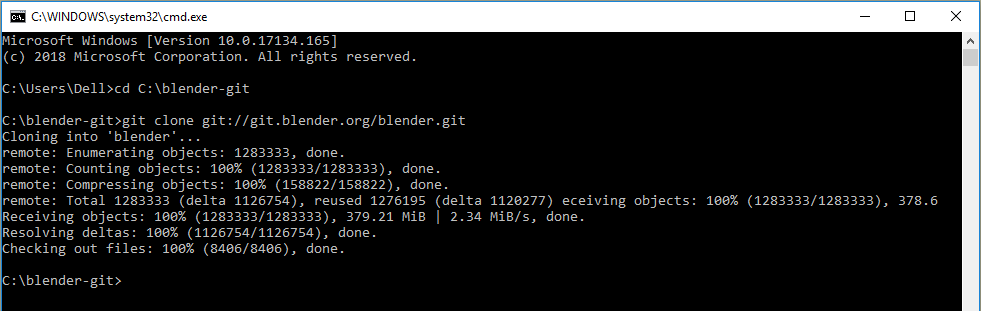
Ready to get Blender source code and the other unknown but necessary stuff. We can follow the instruction. Have to make a folder. I stick to the description: C:\blender-git.
There is a thing: command line. For beginners it can be frightening to type commans but the description on Blender Wiki is pretty clear 😃. We have to lunch cmd which is basically pop up a new window with only text, the so called Command Prompt.


We have to type what Blender Wiki writes about it. Every line of the text is one command. So we have to hit Enter after each line. There are DOS specific commans and others...
There is another interesting thing (which is not very offen communicated) that the font type of a program code is always Courier. Why? I wrote about it here. We can recognize on Blender Wiki that these lines are commands.

5. Precompiled Libraries

This line of command: 
svn checkout https://svn.blender.org/svnroot/bf-blender/trunk/lib/win64_vc14 lib/win64_vc14
tells me that the svn is the command and that's why we had to install SlikSVN. Forthermore on Blender Wiki below the Advanced Setup we can read that.
"Subversion is required for accessing precompiled libraries."
It is a little bit of help to understand what is going on, but somebody should tell me what are these precompiled libraries?
I run that svn command and it took around 15 minute to download (?) all the stuff and it required 7 GB discpace.


Now I have this structure below c:\blender-git\lib\win64_vc14\

So we can see libs are stuff in connection with CGI like openSubdiv and openExr.


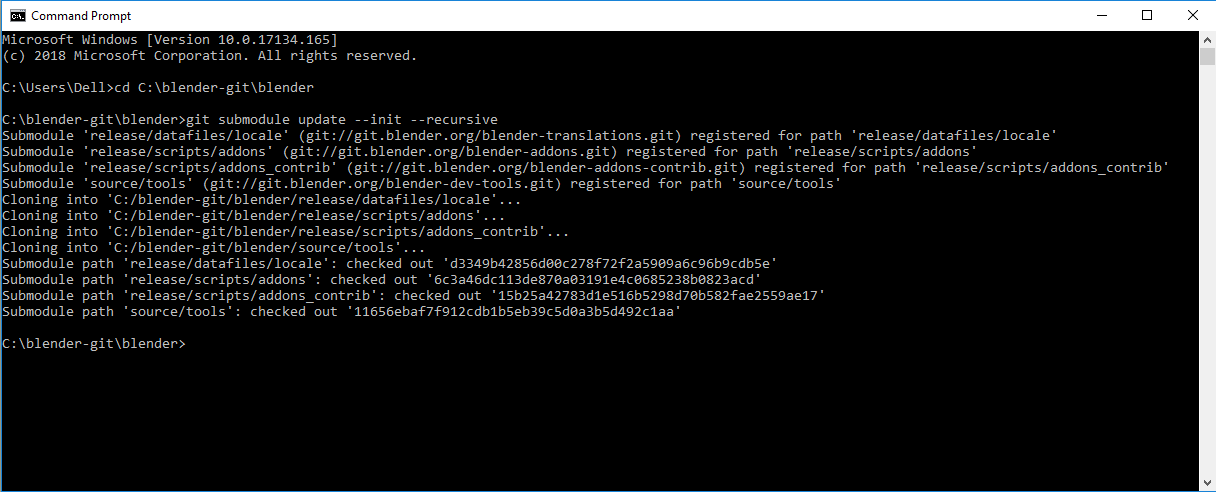
6. The Blender Source Code

The next step is to "download" the Blender source code with git commnads. Of course only lines started with git are these.

It is much faster than te previous step and intrestingly it is only 746 MB.


7. Compile Blender
The final-final step of the begining of this long-long journey. The command:
make full
Simple as one, two, three. It should be. But I got an error message.

No explicit msvc version requested, autodetecting version.
Compiler Detection failed. Use verbose switch for more information.
Visual Studio not found (try with the 'verbose' switch for more information)


I had hard time to figure out how to use 'verbose' switch. According to my experience command switch or flags usually typed like -v or -verbose. Finally I suceeded with that:

make full verboes

And the verbose message was this:

"svn   : C:\Program Files\SlikSvn\bin\svn.exe
cmake : C:\Program Files\CMake\bin\cmake.exe
git   : C:\Program Files\Git\cmd\git.exe
No explicit msvc version requested, autodetecting version.
Detecting msvc 2017
"C:\Program Files (x86)\Microsoft Visual Studio\Installer\vswhere.exe" -latest  -requires Microsoft.VisualStudio.Component.VC.Tools.x86.x64`
Visual Studio is detected but the "Desktop development with C++" workload has not been instlled
Detecting msvc 2015
Visual Studio 2015 not found.
Compiler Detection failed. Use verbose switch for more information.
Visual Studio not found (try with the 'verbose' switch for more information)"


I had to have some help because I had no idea what to do. I felt that something with Visual Studio is not correct. As I wrote before there was a wierd stuff at the first launch. I subscribed to bf-committers@blender.org mailing list long time ago so I had the chance to ask about this problem. Fortunatelly I got an answer and it solved to problem.
I had to install another workload to Visual Studio called Desktop development with C++


With pyhton extension and C++ desktop development extension: 5.2 GB

After that it workd fine for me.


 BLENDER IS BUILT!

One little problem that I did not get the massage described on Blender Wiki:
Blender successfully built, run from: 
C:\blender-git\build_windows_Full_x64_vc14_Release\bin\Release
 Right now I don't know why but the complied version of Blender works fine. Yupee! It is the version 2.79 which is stable but 2.8 is comming soon, so I have to investigate how to get the source code of 2.8 and complie it.
To be continued...

Monday, April 16, 2018

Blender - Animation Nodes (AN)

If you heard about Blender you might hear about Animation Nodes (AN for short). Really-really awsome add-on for procedural workflows developed by an incerdibly young guy, Jacques Lucke.

You can find everything about AN here.

And here is the annual showreel of Animation Nodes (and Blender of course). I think now Blender is on the verge of spreading all over the CG/VFX industry. This clip shows with Blender you can really do anything.


You can find my name on the list of the supporters! Finally I became famous :)

Saturday, February 17, 2018

Blender 2.8 - You know...
Now is the time!

Blender Code Quest 

Pretty please with surag on the top, help to fund the Blender 2.8 project right here, right now!

Well if you don't know what I'm talking about (btw you live in a cave in this case) you can read about it here:

If you don't know what is Blender, in this case I have to ask: 
Are you a robot or an A.I. algorithm and you are about to crash my blog??

Thursday, March 16, 2017

The benefits of using Blender - Bug reporting and solving

On a sunny morning at the beginning of March I found that if I hit OpenGL render active viewport in the Video Sequence Editor Blender crashed. I tried it different ways and I realized that the reason is  the scene had Grace Pencil drawing. It was a bug. I was kind of newbe using Blender but I had internet so I search for bug reporting. I found that article in Blender Nation:
Reporting Bugs in Blender 

I just followed the instruction. I had to register on developer.blender.org forum. So I report the bug on 1st of March (2017) and within a day I got the confirmation and on the same day there was a new daily release which did not produce the crash. Pretty amazing, isn't it! Which commercial software company can compete with this?
Btw the (latest) daily build which can be found here: https://builder.blender.org/download

Thursday, January 12, 2017

Switch to Blender - Forget the Maya (or 3DS Max) input preset

So much stuff is going on. I have a lot of topic I want to write about: naming convention, pipeline stuff, etc. But right now the most important thing for me is that I made the first big step toward Blender. Really :)

The first and very important thing that I had to do to get on the right track is to use the Blender default interaction preset instead of Maya.


By doing that I got the feeling what really Blender is instead of miss certain shortcuts used in Maya and got that feeling Maya works better for me. Of course using the Blender default interaction I have to learn tons of new things, but the more I learn about Blender the less I have the feeling that Maya is better. So it is a beginning of a long journey :)

Later I saw a Blender Conference presentation by Tangent Animation and Jeff Bell said exactly what I experienced about the Blender vs Maya interaction...so I know that I'm really on the right track.

Tuesday, July 26, 2016

Technical Papers 1. (Try to avoid overdose of information) - Sketch Animation Poses

Recently I've checked a lot of technical papers (in connection with CGI of course). We can simply overdose ourself with information via surfing on the net. So I try to avoid that and just feature technical papers and videos one by one what I liked most.


In connection with that I found an interesting development project using Blender:


Thursday, August 20, 2015

Gooseberry Project aka Cosmos Laundromat - First Cycle

The Blender Foundation released the first part of their open movie project called Gooseberry Project. The film title is Cosmos Laundromat. I think it is giant leap.


We can find tons of materials about this project on youtube and on the site. Via Blender Cloud we can also have access to all the source materials (blender files, textures, etc.) of the film.

A couple of videos I found usefull:

Animation progress


Victor's rig


Intresting mix of asset creation process


Friday, May 16, 2014

Blender For Feature Animation Film

Recently I have been thinking about Blender. Because I never used it I considering things as a professional who might want to learn and / or switch to Blender.
I think to get a job as a professional Blender user is not an option currently especially in my home country Hungary.
I have a lot of personal projects which involves CGI and VFX as well and I definitely don't want to spend money to buying softwares for those. So this motivation is pushing me toward open source softwares like Blender.
To compare 3D softwares and discuss about differences between them is a never ending story. I think it is a very complex thing to claim which software is better then the others (if it is possible).
I started to collect information about Blender and watched films like Big Buck Bunny and Tears Of Steel. For me these shorts prove that Blender can produce decent quality full CGI and VFX. I can't say those are cutting edge like VFX that ILM or other major facilities can do. But it is not just about the softwares they use.
Because I'm involved preproduction of a feature animation I raised the question (for myself): Can Blender be a choice for full CGI feature animation? I know there are current project around the world. At the Blender Conference 2013 "father of Blender" Ton Roosendaal mentioned few of them.
Worth to mention Blender community is now working on an open (online) feature animation project: Project Gooseberry